Publishing Calendar Template: How to Build and Use One
Learn how to build a publishing calendar template with the right columns, deadlines, buffer slots and review routine, plus a copy-ready layout.
The most popular advice about a publishing calendar template is to fill it with topics and choose posting dates. That's how you get a calendar that looks finished while the drafts, approvals, and ownership remain unresolved. A useful calendar controls production, not just publication.
Treat each entry as a commitment with a responsible person, a visible status, and preparation deadlines. Leave room for work that slips or becomes urgent, then measure what happens after publication. You don't need elaborate software to do this, but you do need someone responsible for keeping the system honest.
Table of Contents
- Columns Every Publishing Calendar Template Needs
- How to Set Up Your Calendar Step by Step
- A Filled Month You Can Copy
- Review Rhythm and Buffer Slots That Keep It Honest
- Metrics That Show Whether Scheduled Posts Work
- Common Problems and How to Fix Them
- Set Up Your First Calendar This Week
Columns Every Publishing Calendar Template Needs
A publishing calendar template should contain a record for each content item, not just a collection of dates. The record carries the information you need to move that item toward publication. When a deadline slips, you should be able to identify the unfinished task before the release date arrives.
This approach follows editorial calendars' original coordination role in print publishing, where editors aligned contributors, deadlines, and publication dates, as The Content Map's editorial calendar guide explains. A book publisher and a solo LinkedIn creator use the same underlying logic. Their channels, dependencies, and lead times differ.
Start with fields people will maintain
Core fields for a publishing calendar template
| Field | What to Enter | Example |
|---|---|---|
| Content item | Working title of the piece | Lesson from a client onboarding call |
| Channel | Where it publishes | LinkedIn company page |
| Owner | One named person responsible | Maya Chen |
| Pillar or topic | Theme the piece supports | Client process |
| Brief deadline | Date the brief is approved | Monday |
| Draft deadline | Date the first draft is due | Wednesday |
| Approval status | Draft, in review, approved or published | In review |
| Publication date | Date and time it goes live | Thursday, 9:00 |
| Dependencies | Anything that must happen first | Client quote approval |
| KPI | Metric that defines success | Replies from prospects |
Say Maya Chen owns a LinkedIn post about a lesson from a client onboarding call. The working title identifies the idea, while the channel specifies the destination. Maya owns the handoffs even if someone else writes or reviews the post.
In this example, the brief is due Monday, the draft Wednesday, and publication Thursday at 9:00. In review means the piece hasn't cleared approval. The client quote dependency tells Maya what needs resolving, rather than leaving her to chase an unexplained status.
Practical rule: A publication date is a target, not evidence that the content is ready.
Make extra columns earn their place
The minimum small-team setup needs content item, channel, owner, status, brief deadline, draft deadline, and publication date. Keep pillar, audience, dependencies, and KPI when they change a decision. An audience field, for example, earns its place when posts for prospective buyers require different explanations from posts for existing clients.
Don't add fields merely because another template includes them. Copy these columns into Google Sheets or Excel, populate the first few rows with real work, and remove any column nobody will maintain during the coming month. Keep links to drafts alongside the records so reviewers don't have to search through messages.
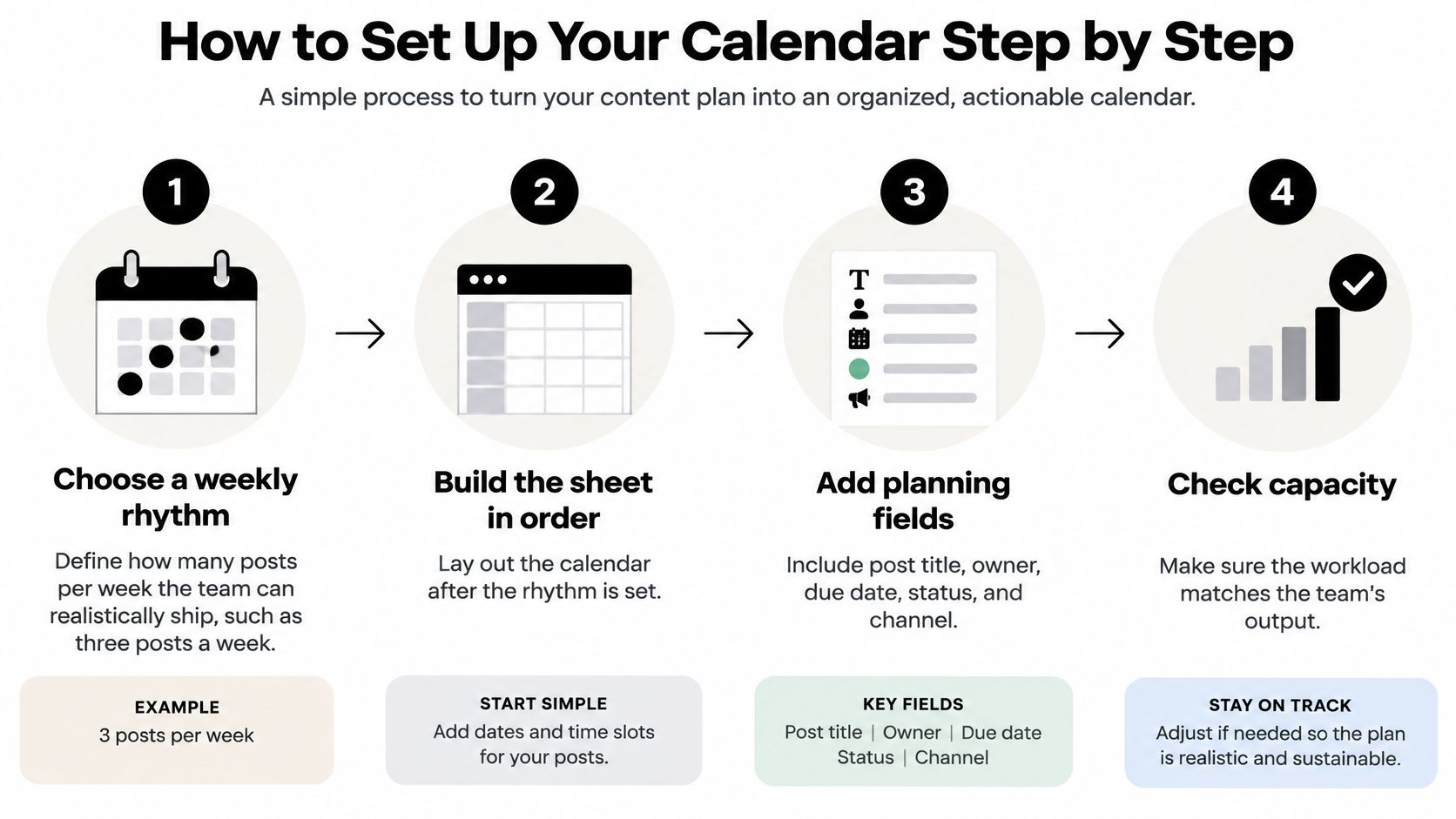
How to Set Up Your Calendar Step by Step
Start with how much the team can realistically ship, not how frequently you'd like to appear on LinkedIn. Count writing, subject-matter input, formatting, and approval as part of that capacity. A writer with available time doesn't help if every post waits on an unavailable founder.
Use this sequence to build the sheet around the work.
Build the records before placing the dates
Choose a realistic weekly rhythm. As a worked example, a team might plan three publishing opportunities each week. Count the opportunities in the actual month, then check whether the people preparing and approving the content can support them.
Create a content list and a calendar view. Keep detailed records in one tab and display publication dates by day in another. Reference the records rather than manually maintaining disconnected copies, which can disagree about what's ready.
Add the planning fields. Use the core columns, with dropdowns for channel and status so people don't invent competing labels. Include audience, review deadlines, and dependencies where those details affect production.
Work backward from publication. The Content Map's content calendar workflow recommends completing the production sequence and scheduling at least two days before publication. Put final approval before that cutoff, editorial review before approval, and the draft and brief early enough to accommodate revisions.
The onboarding example needs attention under that rule: a Wednesday draft isn't compatible with a Thursday release if the team protects that scheduling lead time. Move the draft earlier or change the publication target. Don't keep an attractive date by pretending the review takes no time.
Make the next action visible
Assign a named owner. The owner coordinates completion and flags risk; they don't have to perform every task. Use a person's name rather than Marketing or Client team.
Place the item on the schedule. Give each committed post a day, time, and relevant time zone. In our PostPilot workflow, planning brings topics into a content plan with a clear next step, while scheduling shows intended publication times on a content calendar; the demonstration illustrates these stages with preset examples.
Apply status colors with text labels. Use distinct colors for drafting, review, approved, scheduled, and published. Keep the words visible because color alone won't explain what someone needs to do.
Populate the month from real expertise. Pull topics from client questions, project lessons, and recurring explanations, then group related ideas using a topic cluster strategy. Write the next action into each active record, such as request quote permission or send draft to reviewer.
Before committing the month, filter for missing owners, publication targets, and statuses. Resolve those gaps before treating an item as scheduled. Keep uncommitted ideas in the backlog rather than giving them dates that imply preparation has started.
A Filled Month You Can Copy
Each row below represents a content item or reserved opportunity, the status identifies its production stage, and an open slot has no committed item yet. These are illustrative entries from a month, not a recommendation to publish only this often.
A filled month: four rows from one calendar
| Content item | Channel | Owner | Status | Publication date |
|---|---|---|---|---|
| Client onboarding lesson | LinkedIn company page | Maya Chen | In review | First Thursday, 9:00 |
| Pricing question from prospects | LinkedIn company page | Alex Rivera | Draft | Second Tuesday, 10:00 |
| Project retrospective insight | LinkedIn personal profile | Maya Chen | Brief approved | Third Wednesday, 9:00 |
| Reactive product update | LinkedIn company page | Unassigned until claimed | Open slot | Fourth Friday, 10:00, reserved |
Maya's onboarding post is waiting for review, so its publication target remains conditional. Alex's pricing post still needs drafting and approval. The retrospective has an agreed direction but isn't ready to schedule just because someone approved its brief.
The company page and personal profile entries use the same structure. Keep their editorial perspectives distinct even when they share a theme. A topic cluster generator can help organize related angles, but each row still needs a specific point.
Reserved capacity isn't unfinished planning. It's capacity you've deliberately chosen not to commit.
The reactive row stays unassigned until someone claims it. Before scheduling any active item, confirm its owner, date, and status. An open slot is exempt from ownership until activation, but it must remain visibly marked as reserved.
Review Rhythm and Buffer Slots That Keep It Honest
A calendar can be full on paper while nothing is ready to publish. That happens when people keep adding commitments without checking reviewer availability, unfinished drafts, or changing priorities.
The mismatch is easy to recognize. In Adobe's 2025 report on Australian marketing teams, 86% of Australian marketing professionals had seen content demand rise over the previous two years. Many teams also say strategy and daily publishing should be aligned, yet far fewer connect that intent to owners, dates and status. More calendar entries will not resolve missing capacity or unclear handoffs.
Treat the calendar as production control. Every review should answer whether commitments still fit the people, approvals and slack available.
Give each review a different job
- Weekly risk review. Check approaching publication dates, overdue tasks, and anything waiting on another person. Use a short, fixed agenda: what is blocked, who can resolve it, and which commitment needs changing.
- Monthly prioritization. Decide which themes deserve capacity before assigning individual topics. Remove work that no longer serves a current audience need or business priority.
- Quarterly reset. Reconsider themes, production capacity and performance together. Reduce the planned rhythm if the team can only maintain it through rushed reviews.
A content workflow diagram helps expose approval handoffs that a publication-only view hides. Name a backup for each reviewer, including client and regional reviewers, and confirm their authority before the primary reviewer takes leave.
Use the video as a prompt for a team discussion about which handoffs need explicit ownership.
Protect space before you need it
I'd reserve one recurring weekly opening rather than distribute every available slot to planned posts. That creates room for a product announcement, timely response or delayed item without assuming extra production capacity.
Say client sign-off arrives late and the post cannot meet its intended release. Move it to the reserved Friday opportunity if it still matters, and defer the lowest-priority item if the remaining workload exceeds capacity. Do not recover the schedule by skipping required approval.
Capacity test: If next week has no open opportunity, move something before an urgent request makes the decision for you.
Metrics That Show Whether Scheduled Posts Work
A crowded schedule tells you how much work you've planned. It doesn't tell you whether the team delivered it or whether the audience found it useful. Measure operational reliability and content outcomes separately.
Add planned date, actual date, on-time status, reach, engagement rate, meaningful interactions, and attributable inquiries to your records. Review delivery variance weekly, keeping the original commitment intact so rescheduling doesn't erase missed deadlines.
Metrics to record and what each one answers
| Metric | How to Calculate or Record It | Question It Answers |
|---|---|---|
| On-time delivery | Published by committed date divided by items due | Is the team hitting its dates? |
| Backlog to published rate | Published ideas divided by ideas captured | Are ideas becoming posts? |
| Engagement rate | Interactions divided by reach | Does the content resonate with the audience? |
| Meaningful interactions | Replies, direct messages and saves | Are the right people responding? |
| Inquiries | Conversations tagged to the post | Does the post create business? |
| Attribution window | Agreed period after publication before review | When is the result judged? |
Define success before drafting
Write a hypothesis for the post, the intended audience action, a relevant baseline, and a review date. For the onboarding example, the hypothesis might be that explaining a preventable handoff problem encourages prospective clients to discuss their own process.
A qualified conversation may be the right success criterion for that post. Broad reach could still be useful, but it shouldn't replace the business outcome after publication because impressions look better.
For attribution, record how you connected an inquiry to the content: a direct reply, a message referencing the post, or a prospect's own explanation. Don't label every conversation during the review period as content-generated.
Grafista's content calendar guide reports that accounts publishing in 20 or more weeks achieved approximately 450% higher median engagement per post than accounts publishing in four weeks or fewer, but the finding is observational and doesn't establish that consistency caused the difference.
Review with a decision in mind
Use a consistent definition of engagement rate, and distinguish relevant responses from interaction totals. Record the source insight, audience problem, author perspective, and review notes so you can identify what deserves repeating or revising.
At review, choose a next action: reuse the angle, improve the explanation, change distribution, or stop pursuing the topic. Judge the post on its agreed review date, not its publication day.
Common Problems and How to Fix Them
When posts keep slipping past their dates, replacing the template is rarely the cheapest fix. Inspect the handoff immediately before the delay. A better-looking calendar won't make an unavailable reviewer respond.
Use these changes to address the operating problem this week.
Calendar symptoms, likely causes and fixes
| Symptom | Likely Cause | Fix |
|---|---|---|
| Posts go live late | Approval takes longer than planned | Set an agreed two-working-day approval deadline and name a backup reviewer |
| No open slot for urgent news | Every slot is filled | Keep one open slot each week for reactive posts |
| Calendar looks full but nothing ships | Dates without status | Add a status column and check it in the weekly review |
| Posts read as generic | No source insight field | Record the conversation or project lesson each post comes from |
| Cannot tell what worked | No success criteria | Set the KPI, baseline and review date before drafting |
| Calendar falls out of date | Treated as a static document | Give one owner the weekly update |
Fix approval expectations before enforcing them
Say a legal reviewer routinely needs most of the working week. Imposing the illustrative turnaround in the table won't help unless that reviewer agrees it's feasible and a qualified backup can act. Where required review takes longer, bring the submission deadline forward instead of weakening the review.
The same applies to regional teams and external clients. Confirm availability when assigning the work, not when the draft is already waiting. A backup must have permission to approve the relevant material, not merely access to the document.
Repair the record, not just the wording
Generic posts need stronger inputs before they need another editing pass. Add the actual question, project decision, or source conversation to the row, together with any confidentiality restrictions. Ask the author what they believe and why before polishing the opening sentence.
For lost publishing opportunities, apply the drop-or-defer rule rather than compressing approval. For stale records, assign calendar maintenance to a named person with authority to request updates and flag unready items.
If nobody updates the calendar during the working week, inspect ownership before changing tools. The template can display a decision, but someone still has to make it.
Set Up Your First Calendar This Week
Build a small working system before importing your entire idea backlog. Use Google Sheets or Excel, and keep the sheet as the source of truth until your team has agreed on its production rules.
Make the first cycle manageable
- Choose a planning window. For example, start with four weeks and three publishing opportunities per week. That creates twelve rows, including reserved openings rather than twelve compulsory posts.
- Populate the records. Use actual audience questions and project lessons. Complete the core fields for committed items and clearly identify the rows you're protecting for reactive work.
- Book the reviews. Put a recurring weekly risk check and the first monthly prioritization meeting on the calendar. Invite the people who can resolve dependencies, not everyone who might want an update.
- Compare commitments with delivery. At the monthly review, examine planned and actual publication dates. Adjust the rhythm or preparation deadlines if the team can't sustain its commitments.
Don't move to a scheduling tool to avoid unresolved ownership or approval decisions. A tool should carry out an agreed process, not substitute for one.
Create the sheet today and fill the first row with the client onboarding example. Replace the sample owner and deadlines with real commitments, then confirm who will review the draft.
At PostToGo, our PostPilot concept brings LinkedIn ideation, planning, and scheduling into a connected workflow for businesses and agencies. Select Explore demo to examine the preset Ideate, Plan, and Schedule examples without an account, email address, or LinkedIn connection, and compare the approach with your calendar. The demo doesn't generate live content, save plans, connect to LinkedIn, or publish or schedule real posts.